


In today’s digital world, traditional keys are quickly being replaced by smart and convenient access solutions. One of the most popular options is the door fob—a small, secure device used to unlock doors electronically.
Whether you live in a secure apartment building, work in an office complex, or manage multiple properties, door fobs simplify access while improving security.
In this article, you’ll learn:
- What a door fob is
- How door fobs work
- Types of door fob systems
- Advantages over traditional keys
- Installation and maintenance tips
What Is a Door Fob?
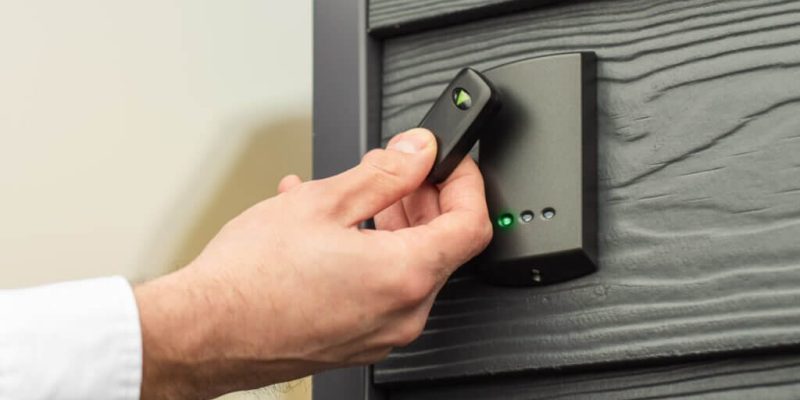
A door fob, also known as a key fob, is a small electronic device used to access secured doors without a traditional key. It typically uses RFID (Radio Frequency Identification) or NFC (Near Field Communication) technology to communicate with a door reader system.
When a door fob is held near the reader, it transmits a signal that grants or denies access based on credentials stored in a central database.
Common Uses: Apartment buildings, office spaces, parking garages, gyms, hotels, universities
How Does a Door Fob Work?
The technology behind a door fob system includes:
- Fob (Transmitter): Contains a unique identifier embedded in a microchip.
- Reader (Receiver): Scans the signal when the fob is presented.
- Access Control Panel: Verifies the fob’s credentials against its database.
- Electric Door Lock: Unlocks the door if access is granted.
Most systems use proximity-based communication, so no physical contact is needed—just a wave or tap near the reader.
Types of Door Fob Access Systems
There are several types of door fobs and systems depending on security needs:
Passive RFID Fobs
- No battery required
- Most common and affordable
- Range: Up to a few inches
- Used in residential and commercial buildings
Active RFID Fobs
- Battery-powered
- Longer range (up to 100 feet)
- Higher cost, ideal for gated communities and garages
NFC Fobs or Mobile Credentials
- Often used with smartphones
- Tap-to-enter style access
- Integrated with mobile apps and cloud systems
Encrypted Smart Fobs
- Advanced security using encrypted credentials
- Prevents cloning and hacking
- Often used in government or high-security settings
Who Uses Door Fobs?
| User Type | Application Example |
| Property Managers | Control tenant access to buildings and amenities |
| Business Owners | Restrict access to offices, storage, or data rooms |
| Schools & Universities | Secure dorms, labs, and faculty areas |
| Gyms and Fitness Clubs | Allow 24/7 access to members |
| Hotels | Replace traditional keycards with fobs or mobile credentials |
Benefits of Using a Door Fob System
Convenience
- No more lost keys or rekeying locks
- Quick, hands-free entry
- Easy to assign or deactivate access
Enhanced Security
- Unique codes for each user
- Access logs and activity tracking
- Restrict access to certain areas or hours
Scalability
- Manage multiple doors or properties from one dashboard
- Add or remove users remotely
- Ideal for businesses with staff turnover
Cost-Effective
- Reduces long-term rekeying and locksmith costs
- Long-lasting hardware
- Affordable for small to large properties
How to Choose the Right Door Fob System
When selecting a door fob solution, consider:
| Factor | Why It Matters |
| Number of Users | Choose scalable systems for high-traffic sites |
| Integration | Does it work with your security cameras or alarms? |
| Management Tools | Cloud-based software for easy control |
| Installation Type | Wireless vs. hardwired based on building layout |
| Budget | Options range from $200 to $5,000+ depending on scale |
Tip: Look for systems with mobile app support and cloud-based user management for future-proof access control.
Installation & Setup Overview
Steps to Install a Door Fob System:
- Choose a system that fits your needs (e.g., standalone or networked)
- Mount the reader at the door entrance
- Connect the reader to the electric strike or magnetic lock
- Set up access software on your server or cloud platform
- Issue door fobs to users with personalized credentials
You may need a locksmith or low-voltage technician for proper installation.
How to Replace or Reprogram a Door Fob
- Lost a fob? Deactivate it immediately via the control panel
- Need a replacement? Assign a new fob with the same permissions
- Reprogramming is simple—just scan the new fob and link it to a user profile
Most systems allow remote management, making it easy to control access without being on-site.
Conclusion
So, what is a door fob? It’s a smart, secure, and scalable solution for modern access control. Whether you’re managing an office, apartment complex, or fitness center, door fobs offer unmatched convenience and security.
By choosing the right system and understanding how it works, you can simplify access, reduce risk, and modernize your property’s entry points.
FAQs
1. Are door fobs more secure than keys?
Yes. Door fobs are harder to duplicate, can be easily deactivated, and log user activity.
2. What happens if I lose my door fob?
Contact your property manager or admin. They can deactivate the lost fob and issue a new one.
3. Can door fobs be hacked?
Basic fobs can be cloned, but encrypted smart fobs and modern systems offer strong protection against cloning or hacking.
4. How much does a door fob system cost?
Basic systems start around $200. Enterprise-level systems with cloud software can cost several thousand dollars depending on features.
5. Can I use my phone as a door fob?
Yes. Many modern systems support mobile credentials using NFC or Bluetooth.
Also read: Retro Active Pay: What It Means, Who Gets It, and How It’s Calculated