


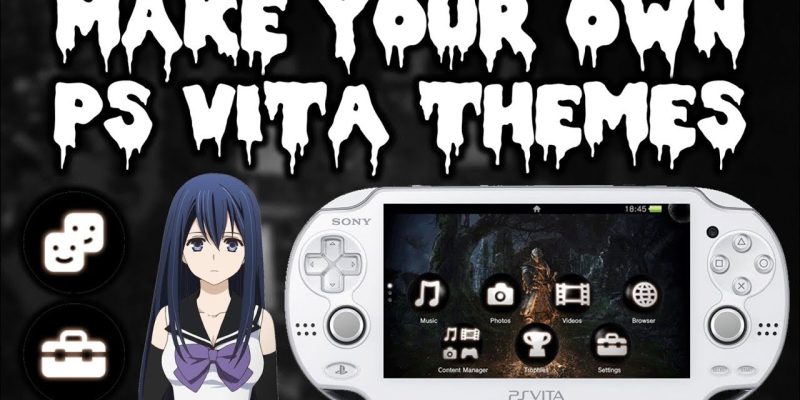
The PlayStation Vita remains one of the most beloved handheld consoles ever released. Despite its age, the PS Vita still has a dedicated community of gamers and creators who continue to personalize the system in unique and exciting ways. One of the easiest ways to customize your console is by installing themes. From official Sony themes to fan made creations, the PS Vita offers countless ways to transform the look and feel of your interface.
If you want to refresh your Vita’s appearance or simply express your favorite games and interests, this guide explores the best themes for PS Vita and how to choose the right one for your console. With a wide variety available, you can make your Vita truly your own.
Why Customizing Your PS Vita with Themes Matters
Themes do more than change colors or backgrounds. They enhance the overall user experience by making your device visually appealing and emotionally personal. Custom themes can reflect your favorite games, characters, anime series, landscapes, or artistic styles.
Beyond aesthetics, themes improve navigation by offering unique icons, sounds, and menu adjustments. Some themes make the interface easier on the eyes, while others add excitement every time you open your handheld. Whether you prefer minimal designs or bold, animated visuals, themes help your PS Vita feel fresh and updated.
Official Sony Themes for PS Vita
Sony released a variety of official themes for the PS Vita during its active years. These themes are known for their high quality design and complete compatibility with the Vita’s interface.
Popular official themes include game based designs such as Gravity Rush, Uncharted Golden Abyss, Killzone Mercenary, Persona 4 Golden, and Freedom Wars. These themes offer specialized icons, custom background art, and unique color palettes inspired by their respective titles.
Official themes also include basic color themes for users who prefer simplicity. These color sets change the background and accent tones without altering icons or sounds, making them perfect for minimalistic styles.
Fan Made Themes and Community Creations
The PS Vita community continues to thrive, especially among fans who create their own themes. Fan made themes often explore more personalized subjects that official releases never covered. These themes range from anime and TV shows to indie games, artwork, and abstract designs.
Since the community actively creates new themes, the variety is constantly expanding. Many players turn to these custom designs when they want something more unique than what Sony originally offered. The creativity found in fan made themes is one of the biggest reasons the Vita remains visually customizable even years after its launch.
Dynamic and Animated PS Vita Themes
Dynamic themes are a favorite among users because they offer movement and depth. Unlike static themes, these include animated backgrounds, shifting color transitions, or interactive effects. The animations bring the home screen to life, making your Vita feel more modern and engaging.
Some dynamic themes respond to user actions, such as swiping through screens. Others feature looping animations that create a relaxing or visually stimulating atmosphere. While dynamic themes use slightly more system resources than static ones, they add a premium feel to your handheld console.
Themes Based on Popular PS Vita Games
Many of the best PS Vita themes come directly from popular games. These themes allow fans to immerse themselves even further in the worlds they love. Game based themes typically include artwork and icons directly inspired by the game’s characters, environments, and menus.
For example, the Persona 4 Golden theme showcases bold yellow coloring and character silhouettes. The Gravity Rush theme features Kat, Raven, and cityscape art that matches the game’s aesthetic. Uncharted and Killzone themes use darker tones to match their action packed atmospheres.
If you want your PS Vita to complement your favorite game, these themes are excellent choices.
Anime Inspired Themes for PS Vita
Anime remains a major influence on the PS Vita community. Many PS Vita owners also enjoy Japanese animation, and the console has a strong library of anime style games. Anime themed designs are among the most downloaded fan creations.
These themes often include beautiful character artwork, matching icon sets, and bright color palettes. Whether you enjoy action anime, romance, slice of life, or fantasy series, you can find a theme that fits your interests.
Anime themes provide the perfect blend of personality and artistic style, making them one of the most widely used categories in the community.
Minimalistic and Artistic Themes
Not everyone wants bold colors and character images. Some PS Vita users prefer a calm and minimalistic interface. Minimal themes typically use soft colors, geometric patterns, or elegant designs with subtle gradients.
These themes reduce visual noise and create a simple, clean home screen. Minimalistic themes are great for users who prefer a modern look or want an interface that blends smoothly with any game library.
Artistic themes, on the other hand, focus on creativity and unique visuals. These may include painted backgrounds, sketches, photography, or abstract artwork. They offer a stylish option for users who want something visually striking but not tied to a specific franchise.
Custom Themes for Modded PS Vita Systems
Modding has extended the life of the PS Vita significantly. Modified consoles can install custom themes beyond the official store offerings. These themes often include custom icons, background music, and advanced features.
Users with a modded system can install themes directly from community archives and theme packages. Modded themes allow personalization that goes far beyond what Sony provided, offering complete freedom over background images, colors, icons, and even sound effects.
If you have a modded Vita, you have access to one of the largest and most creative theme libraries of any handheld console.
How to Choose the Best PS Vita Theme for Your Preferences
Selecting the best theme depends on your personal style and how you use your PS Vita. Some players prefer bright and bold designs that stand out immediately when they unlock their device. Others choose subtle, minimalistic themes that improve visibility and reduce distractions.
Consider whether you value animation, custom icons, or simple color schemes. Think about whether you want a theme based on a game, anime, or artwork. You might even find it useful to switch themes depending on your mood or the games you are currently playing.
The beauty of PS Vita themes is that you are not limited to just one style. You can change your interface anytime you like without affecting your saved data or settings.
How to Install Themes Safely on Your PS Vita
Installing official themes is simple through the PS Store. Once downloaded, you can activate a theme through the settings menu. Fan made themes require more steps, especially on modded systems. These themes are typically installed through theme managers or file transfer tools.
Always download themes from trusted community sources to avoid corrupted files. Make sure your PS Vita has enough storage space and that you follow installation instructions carefully. Proper installation ensures the theme runs smoothly and does not interfere with your console’s performance.
Conclusion
Themes are one of the best ways to personalize your PS Vita and make it feel unique to your gaming style. Whether you prefer official Sony themes, community creations, anime inspired visuals, minimalist designs, or dynamic animated backgrounds, the PS Vita offers endless customization options.
By choosing the right theme, you can transform your handheld into a visually appealing and expressive device. Even years after its release, the PS Vita continues to thrive because of the creativity and passion of its community. With the right theme, your console becomes more than a gaming system; it becomes a reflection of your personal taste and identity.
FAQs
Can I still download official PS Vita themes
Yes, official themes can still be downloaded from the PS Store as long as the service is accessible in your region.
Do I need a modded PS Vita to install custom themes
You need a modded system to install fully custom or fan made themes that are not available in the official store.
Are dynamic themes safe to use
Yes, dynamic themes are safe and work like regular themes, though they may use slightly more system resources.
Can themes slow down my PS Vita
Most themes do not affect performance. Only very complex custom themes may cause minor slowdowns on older firmware.
How many themes can I store on my PS Vita
The number depends on your available storage, as themes take up different amounts of space depending on their design.
Also read: Elon Tech Support – Expert Technical Solutions for Businesses and Individuals