



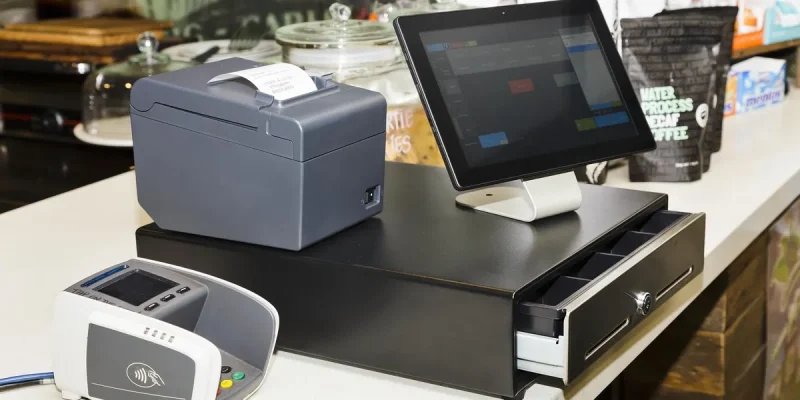
A Point of Sale (POS) system does more than just process payments—it serves as the central hub of your retail or restaurant operation. But to get the most out of your POS setup, you need the right POS accessories.
From barcode scanners to cash drawers and customer-facing displays, these accessories enhance efficiency, improve customer experience, and ensure every sale runs smoothly.
In this guide, we’ll cover the most important point of sale system accessories, how they work, and how to choose the right ones for your business in 2025.
What Are POS Accessories?
POS accessories are hardware devices that connect to your POS terminal or software to extend its functionality. These tools help with:
- Faster checkouts
- Accurate transactions
- Inventory control
- Customer engagement
- Regulatory compliance (e.g., receipts, tax records)
Top 10 Essential POS System Accessories
Here are the most commonly used accessories that can optimize your point of sale setup:
Receipt Printer
Function: Prints customer receipts, transaction summaries, and order tickets.
- Types: Thermal (silent & fast), Dot Matrix (ideal for kitchens)
- Popular Brands: Epson, Star Micronics
Why You Need It: Most businesses are legally required to provide receipts, and they improve professionalism.
Cash Drawer
Function: Securely stores cash, coins, and checks.
- Integration: Opens automatically with each sale
- Features: Multiple compartments, lock-and-key security
Why You Need It: For businesses that accept cash, a sturdy cash drawer is essential for security and speed.
Barcode Scanner
Function: Reads product barcodes for faster and accurate input during checkout.
- Types: Handheld, hands-free, wireless
- Best For: Retail, grocery, pharmacy, and inventory-heavy operations
Why You Need It: Speeds up transactions and reduces errors from manual entry.
Card Reader / Payment Terminal
Function: Accepts debit, credit, and mobile wallet payments (Apple Pay, Google Pay, etc.).
- Options: EMV chip readers, contactless NFC, magnetic stripe
- Common Brands: Square, Clover, Ingenico, Verifone
Why You Need It: To offer multiple payment options and remain PCI-compliant.
Customer-Facing Display
Function: Allows customers to view their purchases, total amount, and tip options in real time.
- Benefits: Transparency, fewer errors, encourages tipping
Why You Need It: Enhances trust and improves customer satisfaction.
POS Monitor / Touchscreen Display
Function: Acts as the main interface for cashiers or servers.
- Features: Touchscreen capabilities, split screens, adjustable stands
Why You Need It: A fast and intuitive interface improves staff productivity.
Label Printer
Function: Prints price tags, barcodes, and inventory labels.
- Used By: Retail stores, warehouses, delis, or shipping departments
Why You Need It: Keeps inventory organized and speeds up restocking.
Scale (for Weighted Products)
Function: Weighs items and integrates the weight into the POS system for pricing.
- Industries: Grocery, delis, produce markets
Why You Need It: Accurate pricing of items sold by weight is critical for compliance and profitability.
Kitchen Display System (KDS)
Function: Displays orders in restaurant kitchens, replacing printed tickets.
- Benefits: Reduces ticket loss, speeds up prep time, allows real-time updates
Why You Need It: Essential for fast-casual and full-service restaurants with high-volume kitchen operations.
Mounts, Stands & Enclosures
Function: Securely holds POS hardware (iPads, screens, printers) in place.
- Benefits: Reduces clutter, prevents theft, ensures ergonomic placement
Why You Need It: Creates a clean and efficient checkout station.
How POS Accessories Improve Business Operations
| Benefit | Description |
| Speed | Faster checkouts and order processing |
| Accuracy | Reduces manual entry errors and inventory mismatches |
| Security | Lockable drawers and encrypted card readers |
| Professionalism | Improves customer trust and experience |
| Compliance | Supports tax documentation, receipts, and product labels |
How to Choose the Right POS Accessories
Here’s how to evaluate which accessories are best for your setup:
Match with Your POS Software
Make sure accessories are compatible with your POS platform (e.g., Square, Shopify, Lightspeed, Toast).
Industry-Specific Needs
- Retail: Barcode scanners, receipt printers, inventory labels
- Restaurants: Kitchen printers, KDS, tip-enabled displays
- Service-Based: Mobile card readers, appointment printers
Volume and Scale
High-traffic businesses may need rugged, commercial-grade accessories vs. entry-level ones for smaller operations.
Wired vs. Wireless
Wireless accessories (Bluetooth/Wi-Fi) offer flexibility but may need frequent charging.
Budget Considerations
Plan for long-term ROI. Accessories should be reliable and durable—not just cheap.
Recommended POS Accessory Bundles (By Industry)
| Business Type | Recommended Accessories |
| Retail Store | Barcode scanner, receipt printer, label printer, cash drawer |
| Restaurant | Kitchen printer, KDS, customer display, card reader |
| Salon or Spa | Mobile payment terminal, appointment printer, cash drawer |
| Mobile Vendor | Wireless receipt printer, tablet stand, contactless reader |
Integration with Modern POS Systems
Many cloud-based POS providers (like Square, Toast, Shopify, Lightspeed) offer plug-and-play compatibility with top accessories.
Look for certified third-party hardware or accessories listed in the provider’s online hardware store.
Maintenance & Troubleshooting Tips
- Regularly clean barcode scanners and touchscreens
- Update device firmware when prompted
- Use surge protectors for all electronic accessories
- Train staff on how to troubleshoot and reset devices
Conclusion
The right POS system accessories transform your point of sale from a simple payment terminal into a powerful business tool. Whether you run a coffee shop, a retail store, or a food truck, investing in the right hardware ensures faster transactions, better inventory control, and happier customers.
Start with the essentials and scale your accessories as your business grows. Remember, your POS hardware is just as important as your software.
FAQs
1. Do I need all the POS accessories to get started?
No. You can start with essentials like a receipt printer and card reader, and add more as you grow.
2. Are wireless POS accessories reliable?
Yes, most modern wireless accessories are reliable with strong Wi-Fi or Bluetooth connections, though they may need regular charging.
3. What’s the most important POS accessory for a retail store?
A barcode scanner and receipt printer are the most crucial for speed and accuracy.
4. Can I use consumer tablets with POS accessories?
Yes, many POS systems support iPads and Android tablets with compatible stands and card readers.
5. How much should I budget for POS accessories?
Expect to spend between $300 and $2,000 depending on the size of your setup and number of accessories needed.
Also read: ATM Franchise: Your Guide to Starting a Profitable Automated Teller Machine Business