


Accurate time tracking is essential for any business with hourly employees. Traditional punch cards and PIN codes are easy to misuse or manipulate. That’s why more employers are turning to thumbprint time card machines—a biometric solution that ensures clock-ins are secure, accurate, and fraud-resistant.
So what exactly is a thumbprint time card machine, and why is it becoming a standard in workforce management?
What Is a Thumbprint Time Card Machine?
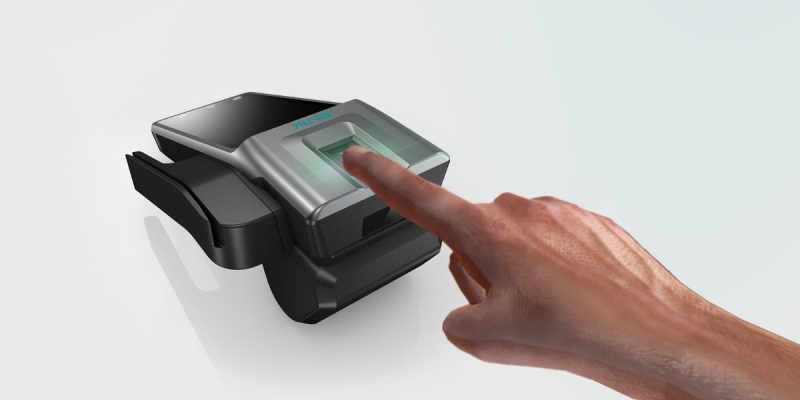
A thumbprint time card machine is a biometric time clock that uses an employee’s fingerprint (typically the thumb) to track work hours. Instead of using cards, codes, or badges, workers scan their thumb to clock in and out.
The machine then:
- Records the exact time of the scan
- Matches it to the employee’s profile
- Logs data into your payroll or attendance system
Also known as: fingerprint time clock, biometric time tracking system, thumbprint attendance machine
How Does a Thumbprint Time Clock Work?
Here’s a breakdown of how thumbprint time tracking works:
- Enrollment – Each employee’s thumbprint is scanned and saved in the system as a digital template.
- Clock-in/Clock-out – Employees place their thumb on the scanner to verify their identity.
- Authentication – The machine compares the scan to the stored fingerprint template.
- Time Logging – Once verified, the system logs the punch-in or punch-out time.
- Data Sync – Hours are sent to integrated software for payroll and reports.
Most systems work offline and online with backup memory in case of connectivity loss.
Why Use a Thumbprint Time Card Machine?
Eliminates Time Theft
- Stops buddy punching (when coworkers clock in for each other)
- Prevents fake or early clock-ins
Improves Accuracy
- Tracks exact time and date with no guesswork
- Reduces manual data entry errors
Enhances Security
- Unique to each employee
- Cannot be copied, lost, or stolen like ID cards
Streamlines Payroll
- Automates total hours
- Reduces payroll discrepancies and disputes
- Syncs with most payroll systems (ADP, QuickBooks, Gusto)
Easy to Use
- Simple setup and intuitive interface
- Quick clock-in process (under 3 seconds)
Features to Look for in a Thumbprint Time Clock
| Feature | Why It Matters |
| High-Resolution Sensor | Ensures accurate reads, even with dirty or wet thumbs |
| Capacity | Support for 50 to 1,000+ users depending on team size |
| Offline Mode | Continues working during internet outages |
| Software Integration | Works with payroll and HR platforms |
| Cloud Access | Real-time reporting and management from anywhere |
| Multiple Punch Options | Some offer PIN, card, or face scan as backup |
| Custom Alerts | Notify managers of tardiness or overtime |
Who Should Use a Thumbprint Time Card Machine?
Ideal for:
- Retail stores
- Warehouses and logistics centers
- Construction sites
- Healthcare facilities
- Restaurants and cafes
- Manufacturing businesses
- Offices with high employee turnover
Small businesses and enterprises alike benefit from improved compliance and accountability.
Top Thumbprint Time Card Machines in 2025
Here are some of the most reliable biometric time clocks this year:
uAttend BN6500
- Wi-Fi and Ethernet connectivity
- Stores up to 3,000 fingerprints
- Cloud-based reporting and mobile app
Fingertec TA500
- USB and LAN support
- Excel-compatible data export
- Ideal for small to medium teams
Pyramid 4000PRO Biometric
- Dual authentication (thumbprint + PIN)
- Built-in time tracking software
- Made in the USA
Allied Time CB4000
- Affordable solution for small businesses
- Offers fingerprint, RFID, and password entry
- Compatible with QuickBooks and Paychex
Always compare device capacity, software features, and support options.
Legal Considerations & Data Privacy
When implementing a thumbprint time card system, make sure you:
- Obtain written consent from employees
- Explain how data is stored, used, and deleted
- Comply with local and federal laws (e.g., BIPA in Illinois)
- Use encryption and secure cloud storage
- Limit access to sensitive biometric data
Many vendors now offer GDPR and CCPA-compliant systems to protect user data.
Setup and Maintenance Tips
- Install the scanner in a convenient, accessible location
- Enroll each employee properly (scan multiple angles of the thumb)
- Clean the scanner regularly to maintain accuracy
- Perform regular backups of your time data
- Train managers on how to manage the system and generate reports
Conclusion
So, if you’re asking whether a thumbprint time card machine is right for your business, the answer is yes—especially if you need better accuracy, accountability, and security in time tracking.
It replaces outdated systems, reduces fraud, and simplifies payroll, saving time and money every pay cycle.
Whether you run a local shop or a national operation, biometric time tracking can elevate your workforce management to the next level.
FAQs
1. Are thumbprint time clocks secure?
Yes. Most systems store encrypted fingerprint templates—not the actual image—and follow strict data privacy regulations.
2. Can thumbprint scanners be used outdoors?
Some models are designed for outdoor use, but make sure to choose a weatherproof, industrial-grade scanner.
3. What if an employee has trouble with the scanner?
Backup methods like PIN entry or RFID cards can be used. High-quality scanners also improve recognition over time.
4. How many employees can a thumbprint time card machine support?
Models range from 50 to over 10,000 users. Choose based on your current and future workforce size.
5. Does a thumbprint time clock require Wi-Fi?
Not always. Many systems operate offline and sync data once a connection is restored.
Also read: Retro Active Pay: What It Means, Who Gets It, and How It’s Calculated